AI Tools
 Health
 Math
Math Everyday Life
 Finance
 Physics
 Chemistry
 Statistics
 Construction
 Pets
Pets Time & Date
 Conversion Calculator
 Sign In
Pages
Category
Follow Us On:
Pages
Category
Follow Us On:
Enter the values to calculate the geometric mean step-by-step.
Related
Use this Geometric Mean Calculator to find the geometric mean of a set of numbers or percentages. It works for small or large datasets, including integers, decimals, and even negative values when converted to growth rates, such as calculating return on investment.
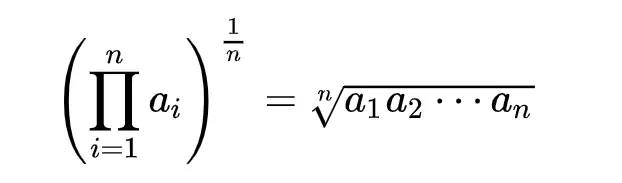
The geometric mean is a measure of central tendency for positive real numbers. It is calculated as the nth root of the product of n numbers.
Find the geometric mean of 12, 23, and 34.
By definition, the geometric mean is for positive numbers, as negative products can lead to undefined or complex results. For negative values representing growth/decline:
Calculate the geometric mean of -20%, 30%, and -15%:
Multiply factors: -0.8 × 1.3 × -0.85 = 0.884
Cube root: ∛0.884 ≈ 0.9597 → Convert back to %: (0.9597 - 1) × 100 ≈ -4.03%
✅ Interpretation: Even with declines, a meaningful geometric mean can be calculated.
For large datasets or when handling negative numbers indirectly:
This simplifies multiplication into addition and is numerically stable.
If zero appears, the geometric mean becomes undefined. Options include:
⚠️ Note: Most calculators do not adjust for zeros automatically.
Related
Add this calculator to your site.
×Just copy a given code & paste it right now into your website HTML (source) for suitable page.
Preview:



Easter into Action, Save With Satisfaction
UPTO
50 %
OFF
Give Us Your Feedback
Share Result
Geometric Mean Calculator

Links
Home Conversion Calculator About Calculator Online Blog Hire Us Knowledge Base Sitemap Sitemap TwoEmail us at
Contact Us© Copyrights 2026 by Calculator-Online.net