
Calculator Online
 AI Tools
 Health
 Math
Math Everyday Life
 Finance
 Physics
 Chemistry
 Statistics
 Construction
 Pets
Pets Time & Date
 Conversion Calculator
 Sign In
Pages
Category
Follow Us On:
Calculator Online
Pages
Category
Follow Us On:
Related
Our Data Transfer Calculator allows you to estimate the time and speed required to move data between devices or networks. Understanding the data transfer rate is essential for selecting bandwidth and calculating download times for your Internet service provider (ISP).
To determine data transfer time, follow these steps:
You can compute transfer speed with this formula:
Speed = Data Transferred / Duration
Similarly, to calculate the time it will take to transfer data:
Duration = Data Transferred / Speed
Data Transfer Rate indicates how much digital information is transmitted from one point to another per unit of time. It can be calculated manually or using a data transfer calculator.
DTR = Data Transferred / Time
For accurate results, use a bandwidth or transfer rate calculator to factor in connection speed and overhead.
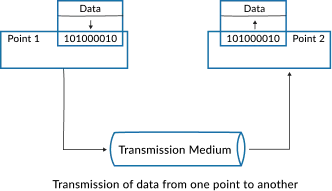
Transfer rates are typically expressed in Megabits per second (Mbps) or Megabytes per second (MBps). Modern networks can reach extremely high speeds, such as Japan’s optical fiber system achieving up to 1,414 Tbps.
| Decimal Prefix | Binary Prefix |
|---|---|
| 1 kbit/s (kbps) = 1,000 bit/s | 1 kbit/s (kbps) = 1,000 bit/s |
| 1 Mbit/s (Mbps) = 1,000,000 bit/s | 1 Mibit/s = 1,048,576 bit/s |
| 1 Gbit/s (Gbps) = 1,000,000,000 bit/s | 1 Gibit/s = 1,073,741,824 bit/s |
| 1 Tbit/s (Tbps) = 1,000,000,000,000 bit/s | 1 Tibit/s = 1,099,511,627,776 bit/s |
Data transfer can fluctuate due to overheads, which ensure reliable and error-free transmission. Common causes include:
Calculate the transfer time for a 500 MB file over a 15 Mbps connection:
Step 1: Convert file size to Megabits: 500 × 8 = 4000 Mb
Step 2: Use the formula DTR = Data / Speed
DTR = 4000 ÷ 15 ≈ 266.67 seconds ≈ 4 minutes 27 seconds
| Name | Symbol | Bits/sec | Bytes/sec | Bits/sec Formula | Bytes/sec Formula |
|---|---|---|---|---|---|
| Bit/Second | bit/s | 1 | 0.125 | 1 | 1/8 |
| Byte/Second | B/s | 8 | 1 | 8 | 1 |
| Kilobit/Second | kb/s | 1,000 | 125 | 10³ | 10³ ÷ 8 |
| Kibibit/Second | Kibit/s | 1,024 | 128 | 2¹⁰ | 2¹⁰ ÷ 8 |
| Kilobyte/Second | kB/s | 8,000 | 1,000 | 8 × 10³ | 10³ |
| Kibibyte/Second | KiB/s | 8,192 | 1,024 | 2¹³ | 2¹⁰ |
Use a transfer app or move files via a computer. For faster transfers, use USB 3.0 connections.
USB 3.0 can achieve up to 5 Gbps, roughly 625 MB/s.
Related
Add this calculator to your site.
×Just copy a given code & paste it right now into your website HTML (source) for suitable page.
Preview:



Easter into Action, Save With Satisfaction
UPTO
50 %
OFF
Give Us Your Feedback
Share Result
Data Transfer Calculator

Links
Home Conversion Calculator About Calculator Online Blog Hire Us Knowledge Base Sitemap Sitemap TwoEmail us at
Contact Us© Copyrights 2026 by Calculator-Online.net
